ကြန္ပ်ဴတာဖိုင္မ်ားတြင္ Header code ေတြပါတယ္။ အဲဒီ Header code ေတြက Hex number ေတြျဖစ္ပါတယ္။
Hex number ဆိုတာက 0 to F (0.1.2...9,A,B....F) ေတြျဖစ္ပါတယ္။ အဲဒီ Header code ေတြကို ေျပာင္းလိုက္ရင္
အဲဒီဖိုင္ကို ဖြင့္မရေတာ့ပါဘူး။ အဲဒီယူဆခ်က္ကိုသံုးၿပီးေတာ့ jpeg ဖိုင္ေတြရဲ႕ Header code ကိုေျပာင္းရင္
အဲဒီ JPEG ဖိုင္ဟာ ဖြင့္မရေတာ့ဘူးေလ။ သူမ်ားမျမင္ေစခ်င္တဲ့ ကိုယ့္ဓာတ္ပံုေတြကို ဒီနည္းလမ္းသံုးၿပီး
ဘာ software မွမလိုပဲ ေဖ်ာက္လို႔ရပါတယ္။
1. Start ကေန Run ကိုသြားပါ။ cmd လို႔႐ိုက္ထည့္ပါ။
2. အနက္ေရာင္ Command Prompt Window ပြင့္လာပါလိမ့္မယ္။
3. debug "Your Picture File Location" လို႔႐ိုက္ထည့္ပါ။ ဥပမာ. သင့္ပံုက D:\ ထဲမွာရိွၿပီး File name က
mypic.jpg ဆိုရင္ debug D:\mypic.jpg လို႔႐ိုက္ပါ။ ၿပီးရင္ Enter ေခါက္ပါ။
4. e 100 လို႔႐ိုက္ၿပီး Enter ေခါက္ပါ။
5. ။ ဥပမာ- 1381:0100 FF. လို႔ေပၚလာပါလိမ့္မယ္။ အဲဒီမွာ FF. ဆိုတာ မူရင္း Header code ျဖစ္ပါတယ္။
အဲဒါကို ေသခ်ာမွတ္ထားပါ။ ၿပီးေတာ့ AA လို႔႐ိုက္ၿပီး Enter ေခါက္ပါ။
AA လို႔မ႐ိုက္ခ်င္လည္း 00,11,22,....,FF ထဲကေန ကိုယ္ႀကိဳက္တာကို႐ိုက္ပါ။
ဒါေပမဲ့ မူရင္း Header code ကိုေတာ့ ႐ိုက္လို႔မရဘူးေနာ္။
6. w လို႔႐ိုက္ၿပီး Enter ေခါက္ပါ။
7. Writing xxxxx bytes ဆိုၿပီး ေပၚလာပါလိမ့္မယ္။ ဥပမာ Writing 0B586 bytes
8. q လို႔႐ိုက္ၿပီး Enter ေခါက္ပါ။
9. ၿပီးရင္ Exit လို႔႐ိုက္ၿပီး Enter ေခါက္လိုက္ရင္ Command Prompt ကေနထြက္သြားပါလိမ့္မယ္။
ဒါဆိုရင္ ၿပီးသြားပါၿပီ။ ႀကိဳက္တဲ့ Picture Viewer နဲ႔ၾကည့္ပါ။ လံုး၀မရပါဘူး။
ျဖည္နည္း
1. အေပၚကအဆင့္ကအတိုင္း အဆင့္ ၄အထိသြားပါ။
2. အဆင့္ ၅မွာ မူရင္း header code ကိုျပန္ထည့္ေပးပါ။ ၿပီးရင္ က်န္အဆင့္ေတြအတိုင္း လုပ္ေဆာင္ပါ။
July 27, 2007

July 20, 2007
My USB Flash drive
This is a list of software that I carry on my portable thumbdrive (1Gb). Almost all of it is Freeware (any exceptions are noted) and most of it is Open Source too.Diagnostics & Removal - Working directly from drive
The flashkey has an autorun.inf to start PStart on double click, or on the right click menu either open explorer or mount a Truecrypt archive (to protect customer data). Lastly the key is bootable with Acronis True Image V9
Installations for PC's
- 7-Zip - Supports ZIP,RAR and many others and it's own 7z format is hard to beat.
- Ad-aware - Spyware cleaner
- ActiveSync 4.2 - PocketPC Sync software
- Adobe Reader 7.08 - PDF Reader
- Audacity - for recording and editing sounds
- Autohotkey - hotkeys and keyboard macro program for repetitive tasks.
- AxCrypt - File Encryption Software with a nice "Shred file" feature
- Blender - suite of tools for 3D creation
- CDBurnerXP Pro - CD/DVD burning solution
- Codecs All-in-one - one of the most complete codec packs
DaemonTools - Virtual CD/DVD-ROM Emulator - Freeware for private use only(V4+ includes spyware, use 3.x)- .NET Framework
- Exact Audio Copy - copy audio data from an audio CD with jitter correction.
- EFS3 (Email Forwarding System) - POP3 gateway for any SMTP server
- Wireshark - network protocol analyzer (changed its name from Ethereal)
- Files and Settings Transfer Wizard - helps you copy files and settings from your old computer to a new computer (Commercial software found on Windows XP CD)
- Filezilla - fast and reliable FTP client and server
- Firefox - open-source browser (or Firefox with Google Toolbar *)
- Firetune - optimization software for Firefox
- Gaim - instant messenger client, which can handle multiple protocols, including AIM, ICQ, Yahoo!
- Google Desktop - easy access to information on your computer and from the web
- GTK+ - package needed for GIMP and Gaim
- HTML Slideshow - create an HTML slide show of your digital pictures
- HTTrack Website Copier - easy-to-use offline browser utility
- ImageResizer Powertoy - resize one or many image files with a right-click.
- Inkscape - Inkscape is a Vector Graphics Editor, similar to Adobe Illustrator
- Flash player for Mozilla/Opera
- InnoSetup - powerful script based freeware installation builder
- Java Runtime Environment - allows end-users to run Java applications
- KeePass - open-source password safe
- LAME - LGPL MP3 encoder for use with EAC.
- MySQL ODBC Connector
- NVU - WYSIWYG HTML editor with site manangement features
- OpenOffice - free office suite to use and distribute
- OpenVPN - full-featured SSL VPN solution
- PaintDotNet - image and photo manipulation software
- PDFCreator - easily creates PDFs from any Windows program. Use it like a printer.
- Barts PEBuilder - Create Windows bootdisk for PC maintenance tasks
- Picasa2 - Get photo software from Google*
- Planner - project scheduling tool
- Quicktime Alternative - Play Quicktime files without installing Quicktime player
- Realplayer Alternative - Play Realplayer files without installing Realplayer
- RunPCRun Total Support - Have to carry around our support package!
- Skype - The now famous VoIP software. Will be lovely when there's a proper Asterisk gateway.
- Spambayes - Probability based mail filter includes Microsoft Outlook plug-in.
- Thunderbird - cross-platform email and Usenet client
- TightVNC - remote control software
- TrueCrypt - create a virtual encrypted disk within a file and mount it as a real disk
- WinSCP - SCP/SFTP client
- XnView - View and convert graphics files - not free for commercial use
Applications - Working directly off drive
- 7-Zip - dragging the folder containing the executables seems to work
- KeePass - Password Safe, use zip version for portability
- Firefox Portable - the portable version of this great browser
- Portable Filezilla - portable FTP client
- Portable Clamwin - portable antivirus
- Portable Gaim - portable Messaging
- Portable NVU - portable HTML editor
- Portable Thunderbird - portable email program
- Notepad2 - notepad replacement
- Spacemonger - show the layout of files and space on a hard drive.
- Putty - SSH client
- TrueCrypt - create a virtual encrypted disk within a file and mount it as a real disk without installation
Diagnostics & Removal - Working directly from drive
- Dependency Walker - scans any Windows module and builds a hierarchical tree diagram of all dependent modules
- DiskMon - logs and displays all hard disk activity
- Filemon - displays file system activity on a system in real-time
- PortMon - displays all serial and parallel port activity
- Process Explorer - shows you information about which handles and DLLs processes have opened or loaded
- Pstools - SysInternals 'Resource Kit'
- RegMon - Real-time Registry monitoring utility
- TCPView - detailed listings of all TCP and UDP endpoints on your system. Graphical netstat
- TokenMon - monitors and displays a variety of security-related activity taking place on a system
- Winobj - display information on the NT Object Manager's name space
- Norton Removal Tool - Norton can be stubborn to remove at times.
- autoruns - show all auto-starting locations
- HijackThis
- "remove msn messenger.cmd" - simply RunDll32 advpack.dll,LaunchINFSection %windir%\INF\msmsgs.inf,BLC.Remove
- RootkitRevealer - advanced rootkit detection utility
- WinsockXPFix - simple winsock fix. i don't know if it's just netsh int ip reset but it does work.
Toolkit - Working directly off drive
- NT Resource Kit - the original resource kit (not freeware)
- 2000 Resource Kit - (not freeware)
- 2000 Support Tools
- 2003 Resource Kit - (not freeware)
- UnixUtils - ports of common GNU utilities
- BluesPortScan - Fast port scanner
- eicar - Anti virus test file
- pixie - an 8Kb colour picker
- rawwritewin - for writing floppy disk images
- tftpd32 - TFTP server
- UPX - powerful executable packer
- Tight VNCviewer - just the viewer
- WinSCP - standalone WinSCP
Commercial Installations
Only two, but I have to have them.
- Acronis True Image V9 - Great HDD imaging utility.
- NOD32 - The only antivirus we recommend
New Art House Myanmar Fonts
You can download Art house myanmar fonts(41 to 60) from this link.
http://download.yousendit.com/F1E777763DB432AE
http://download.yousendit.com/F1E777763DB432AE
July 8, 2007
ကြန္ပ်ဴတာကိုယ္က်င့္တရား ဆယ္ပါး
၁။ ကြန္ပ်ဴတာအား အျခားသူမ်ားကို ထိခိုက္နစ္နာေစရန္အတြက္ အသံုးမျပဳရ။
(ကြန္ပ်ဴတာကိုယ္က်င့္တရားဆိုင္ရာ အေျခခံမူျဖစ္သည္)
၂။ အျခားသူမ်ား၏ ကြန္ပ်ဴတာလုပ္ငန္းမ်ားကို အေႏွာင့္အယွက္မေပးရ။
(ဥပမာ- အဓိပၸာယ္မဲ့ အီးေမးလ္မ်ားကို မတန္တဆေပးပို႔ျခင္း၊ ကြန္ပ်ဴတာဗိုင္းရပ္စ္မ်ားေပးပို႔ျခင္း)
၃။ အျခားသူမ်ား၏ ကြန္ပ်ဴတာဖိုင္မ်ားကို ခိုးမၾကည့္ရ။
(တစံုတေယာက္က ခြင့္ျပဳခ်က္မေပးဘဲ ထိုသူ၏ကြန္ပ်ဴတာဖိုင္မ်ားကို ဖြင့္မၾကည့္ရ)
၄။ ကြန္ပ်ဴတာကို ခိုးမႈက်ဴးလြန္ရန္အတြက္ အသံုးမျပဳရ။
၅။ ကြန္ပ်ဴတာကို လဲြမွားေသာသက္ေသခံရန္အတြက္ အသံုးမျပဳရ။
(ဥပမာ- ေကာလာဟလမ်ားေပးပို႔ျခင္း၊ မိမိအီးေမးလ္လိပ္စာမ်ားကို လဲြမွားစြာေပးပို႔ျခင္း)
၆။ ကုမၸဏီတစ္ခုခုမွ ထုတ္လုပ္သည့္ေဆာ့ဖ္၀ဲမ်ားကို သတ္မွတ္ထားသည့္ အခေၾကးေငြမ်ားေပးေဆာင္ျခင္းမျပဳဘဲ
ကူးယူသံုးစဲြျခင္းမျပဳရ။
ေဆာ့ဖ္၀ဲ၊ ေတးသီခ်င္း စီဒီသို႔မဟုတ္ ဒီဗီြဒီမ်ားကို မူပြားကူးယူၿပီး သူငယ္ခ်င္းမ်ားအား လက္ဆင့္ကမ္းေပးေ၀ျခင္းမျပဳရ)
၇။ တစ္ဦးတစ္ေယာက္ ပိုင္ဆိုင္သည့္ ကြန္ပ်ဴတာျဖင့္ ထိုသူ၏တရား၀င္ခြင့္ျပဳခ်က္မရဘဲ ထိုက္တန္သည့္
အခေၾကးေငြေပးေဆာင္ျခင္းမရိွဘဲကိုယ္က်ိဳးအတြက္ အသံုးမျပဳရ။
၈။ တစ္ဦးတစ္ေယာက္၏အသိဥာဏ္ျဖင့္ ျပဳလုပ္ဖန္တီးထားခ်က္မ်ားကို အပိုင္စီးကာခ်ဳပ္ကိုင္ထားျခင္းမျပဳရ။
(သီခ်င္း၊ဂီတ၊စာ၊႐ုပ္ပံုမ်ားကို မူပိုင္ရွင္ခြင့္ျပဳခ်က္မရဘဲ အပိုင္စီးကာ ထင္သလိုျပဳလုပ္ျခင္း)
၉။ မိမိေရးသားထားသည့္ ကြန္ပ်ဴတာပ႐ိုဂရမ္စနစ္ သို႔မဟုတ္ ဒီဇိုင္းတစ္ခုသည္ လူ႔ေဘာင္အဖဲြ႔အစည္းႏွင့္ ျပႆနာျဖစ္ေစမည့္
အခ်က္မ်ားမျဖစ္ေစရန္ ထည့္သြင့္စဥ္းစားရမည္။
၁၀။ ကြန္ပ်ဴတာကို လူ႔ေဘာင္က အထင္ႀကီးေလးစားေစမည့္ အခ်က္မ်ားအေပၚတြင္သာ အေျခခံၿပီးသံုးစဲြရမည္။
(တစ္ဦးတစ္ေယာက္က မလုပ္ပါႏွင့္ဟု အမိန္႔ေပးေစခိုင္းမွ ေရွာင္ၾကဥ္ရျခင္းထက္ ကိုယ္တိုင္ကမလုပ္သင့္ မလုပ္ထိုက္သည့္
ကိစၥတစ္ခုအေနျဖင့္ ေရွာင္ၾကဥ္ရန္ျဖစ္သည္)
(ကြန္ပ်ဴတာကိုယ္က်င့္တရားဆိုင္ရာ အေျခခံမူျဖစ္သည္)
၂။ အျခားသူမ်ား၏ ကြန္ပ်ဴတာလုပ္ငန္းမ်ားကို အေႏွာင့္အယွက္မေပးရ။
(ဥပမာ- အဓိပၸာယ္မဲ့ အီးေမးလ္မ်ားကို မတန္တဆေပးပို႔ျခင္း၊ ကြန္ပ်ဴတာဗိုင္းရပ္စ္မ်ားေပးပို႔ျခင္း)
၃။ အျခားသူမ်ား၏ ကြန္ပ်ဴတာဖိုင္မ်ားကို ခိုးမၾကည့္ရ။
(တစံုတေယာက္က ခြင့္ျပဳခ်က္မေပးဘဲ ထိုသူ၏ကြန္ပ်ဴတာဖိုင္မ်ားကို ဖြင့္မၾကည့္ရ)
၄။ ကြန္ပ်ဴတာကို ခိုးမႈက်ဴးလြန္ရန္အတြက္ အသံုးမျပဳရ။
၅။ ကြန္ပ်ဴတာကို လဲြမွားေသာသက္ေသခံရန္အတြက္ အသံုးမျပဳရ။
(ဥပမာ- ေကာလာဟလမ်ားေပးပို႔ျခင္း၊ မိမိအီးေမးလ္လိပ္စာမ်ားကို လဲြမွားစြာေပးပို႔ျခင္း)
၆။ ကုမၸဏီတစ္ခုခုမွ ထုတ္လုပ္သည့္ေဆာ့ဖ္၀ဲမ်ားကို သတ္မွတ္ထားသည့္ အခေၾကးေငြမ်ားေပးေဆာင္ျခင္းမျပဳဘဲ
ကူးယူသံုးစဲြျခင္းမျပဳရ။
ေဆာ့ဖ္၀ဲ၊ ေတးသီခ်င္း စီဒီသို႔မဟုတ္ ဒီဗီြဒီမ်ားကို မူပြားကူးယူၿပီး သူငယ္ခ်င္းမ်ားအား လက္ဆင့္ကမ္းေပးေ၀ျခင္းမျပဳရ)
၇။ တစ္ဦးတစ္ေယာက္ ပိုင္ဆိုင္သည့္ ကြန္ပ်ဴတာျဖင့္ ထိုသူ၏တရား၀င္ခြင့္ျပဳခ်က္မရဘဲ ထိုက္တန္သည့္
အခေၾကးေငြေပးေဆာင္ျခင္းမရိွဘဲကိုယ္က်ိဳးအတြက္ အသံုးမျပဳရ။
၈။ တစ္ဦးတစ္ေယာက္၏အသိဥာဏ္ျဖင့္ ျပဳလုပ္ဖန္တီးထားခ်က္မ်ားကို အပိုင္စီးကာခ်ဳပ္ကိုင္ထားျခင္းမျပဳရ။
(သီခ်င္း၊ဂီတ၊စာ၊႐ုပ္ပံုမ်ားကို မူပိုင္ရွင္ခြင့္ျပဳခ်က္မရဘဲ အပိုင္စီးကာ ထင္သလိုျပဳလုပ္ျခင္း)
၉။ မိမိေရးသားထားသည့္ ကြန္ပ်ဴတာပ႐ိုဂရမ္စနစ္ သို႔မဟုတ္ ဒီဇိုင္းတစ္ခုသည္ လူ႔ေဘာင္အဖဲြ႔အစည္းႏွင့္ ျပႆနာျဖစ္ေစမည့္
အခ်က္မ်ားမျဖစ္ေစရန္ ထည့္သြင့္စဥ္းစားရမည္။
၁၀။ ကြန္ပ်ဴတာကို လူ႔ေဘာင္က အထင္ႀကီးေလးစားေစမည့္ အခ်က္မ်ားအေပၚတြင္သာ အေျခခံၿပီးသံုးစဲြရမည္။
(တစ္ဦးတစ္ေယာက္က မလုပ္ပါႏွင့္ဟု အမိန္႔ေပးေစခိုင္းမွ ေရွာင္ၾကဥ္ရျခင္းထက္ ကိုယ္တိုင္ကမလုပ္သင့္ မလုပ္ထိုက္သည့္
ကိစၥတစ္ခုအေနျဖင့္ ေရွာင္ၾကဥ္ရန္ျဖစ္သည္)
From Personal Computer Magazine July 2007
TOP 101 Classic Sites
APPS - PC& MOBILE
www.gmail.com
www.handango.com
www.webex.com
www.yousendit.com
BUSINESS & FINANCE
bloomberg.com
bplans.com
www.irs.gov
www.fool.com
CARRERS
www.dice.com
www.monster.com
hotjobs.yahoo.com
COMPUTING
annoyances.org
broadbandreports.com
www.cnet.com
www.devx.com
distrowatch.com
www.eweek.com
www.extreme.com
www.grc.com
labs.google.com
www.lifehacker.com
www.pcmag.com
www.securityfocus.com
www.slashdot.org
sourceforge.net
www.schools.com
www.webopedia.com
CONSUMAR ELECTRONICS & PHOTOGRAPHY
www.dpreview.com
www.engadget.com
www.flickr.com
www.popphoto.com
www.shutterfly.com
HEALTH
www.cdc.gov
ediets.com
www.webmd.com
www.who.int
INFORMATION, SEARCH & REFERENCE
about.com
answer.com
www.craigslist.com
www.dictionary.com
www.epic.org
www.fedstats.gro
firstgov.gov
www.google.com
www.howstuffworks.com
www.ipl.org
www.lii.org
www.getnetwise.com
www.snopes.com
www.loc.gov
www.nasa.gov
www.nationalgeographic.com
www.nolo.com
www.opensecrets.org
www.pbs.org
www.straightdope.com
www.wikipedia.org
www.yahoo.com
INFORMATION, LIFESTYLE, ENTERTAINMENT & FUN
www.allmusic.com
www.aldaily.com
www.blinkx.com
www.boingboing.net
www.citysearch.com
www.eonline.com
www.epicurious.com
www.espn.com
foodnetwork.com
www.iflim.com
www.imdb.com
www.archive.org
www.mcsweeneys.net
www.nick.com
www.gutenberg.org
ww.theonion.com
www.sciencedaily.com
www.si.edu
www.tv.com
www.urbandictionary.com
music.yahoo.com
news.bbc.co.uk
cnn.com
www.npr.org
www.nytime.com
www.slate.com
www.salon.com
www.salon.com
1up.com
www.gamefly.com
homestarrunner.com
www.overheardinny.com
games.yahoo.com
amazon.com
www.ebay.com
www.netflix.com
overstock.com
shopping.com
suprise.com
www.techbargains.com
www.thinkgeek.com
www.expedia.com
maps.google.com
www.orbitz.com
www.gmail.com
www.handango.com
www.webex.com
www.yousendit.com
BUSINESS & FINANCE
bloomberg.com
bplans.com
www.irs.gov
www.fool.com
CARRERS
www.dice.com
www.monster.com
hotjobs.yahoo.com
COMPUTING
annoyances.org
broadbandreports.com
www.cnet.com
www.devx.com
distrowatch.com
www.eweek.com
www.extreme.com
www.grc.com
labs.google.com
www.lifehacker.com
www.pcmag.com
www.securityfocus.com
www.slashdot.org
sourceforge.net
www.schools.com
www.webopedia.com
CONSUMAR ELECTRONICS & PHOTOGRAPHY
www.dpreview.com
www.engadget.com
www.flickr.com
www.popphoto.com
www.shutterfly.com
HEALTH
www.cdc.gov
ediets.com
www.webmd.com
www.who.int
INFORMATION, SEARCH & REFERENCE
about.com
answer.com
www.craigslist.com
www.dictionary.com
www.epic.org
www.fedstats.gro
firstgov.gov
www.google.com
www.howstuffworks.com
www.ipl.org
www.lii.org
www.getnetwise.com
www.snopes.com
www.loc.gov
www.nasa.gov
www.nationalgeographic.com
www.nolo.com
www.opensecrets.org
www.pbs.org
www.straightdope.com
www.wikipedia.org
www.yahoo.com
INFORMATION, LIFESTYLE, ENTERTAINMENT & FUN
www.allmusic.com
www.aldaily.com
www.blinkx.com
www.boingboing.net
www.citysearch.com
www.eonline.com
www.epicurious.com
www.espn.com
foodnetwork.com
www.iflim.com
www.imdb.com
www.archive.org
www.mcsweeneys.net
www.nick.com
www.gutenberg.org
ww.theonion.com
www.sciencedaily.com
www.si.edu
www.tv.com
www.urbandictionary.com
music.yahoo.com
news.bbc.co.uk
cnn.com
www.npr.org
www.nytime.com
www.slate.com
www.salon.com
www.salon.com
1up.com
www.gamefly.com
homestarrunner.com
www.overheardinny.com
games.yahoo.com
amazon.com
www.ebay.com
www.netflix.com
overstock.com
shopping.com
suprise.com
www.techbargains.com
www.thinkgeek.com
www.expedia.com
maps.google.com
www.orbitz.com
June 23, 2007
Windows XP ကို ပိုျမန္ေစမယ့္နည္းလမ္းမ်ား
Prefetcher ကို Tweak လုပ္ျခင္း
Windows XP တြင္ Prefetcher ဟုေခၚေသာႀကိဳတင္စုေဆာင္းသည့္စနစ္ပါရိွပါသည္။ ထို Prefetcher သည္ မၾကာခဏ
အသံုးျပဳေသာ Application မ်ားဖြင့္ရာတြင္ လိုအပ္ေသာ Files မ်ားကိုႀကိဳတင္စုေဆာင္းထားေသာေၾကာင့္ ေနာင္တစ္ဖန္ ထို
Application မ်ားကို ဖြင့္ရာတြင္ ေႏွာင့္ေႏွးၾကန္႔ၾကာျခင္းမရိွေတာ့ေပ။
Prefecher ၏ Value ကိုဤကဲ့သို႔ေျပာင္းလဲႏိုင္သည္။
Registry Editor ကိုဖြင့္ပါ။
HKEY_LOCAL_MACHINE\SYSTEM\ControlSet001\Control\Session Manager\Memory Management\PrefetchParameters
သို႔သြားပါ။
EnablePrefetcher Value ကို ေျပာင္းပါ။
1 သည္ Application Files မ်ားကို Prefetch လုပ္ခိုင္းျခင္းျဖစ္သည္။
2 ဟု႐ိုက္ထည့္ပါက Boot Files မ်ားကို Prefetch လုပ္ေပးလိမ့္မည္။
3 ဆိုပါက မိမိအသံုးျပဳေသာ Files မ်ားကို တတ္ႏိုင္သေလာက္ Prefetch လုပ္ေပးပါလိမ့္မည္။
ဆက္လက္ေရးသားပါမည္။
Windows XP တြင္ Prefetcher ဟုေခၚေသာႀကိဳတင္စုေဆာင္းသည့္စနစ္ပါရိွပါသည္။ ထို Prefetcher သည္ မၾကာခဏ
အသံုးျပဳေသာ Application မ်ားဖြင့္ရာတြင္ လိုအပ္ေသာ Files မ်ားကိုႀကိဳတင္စုေဆာင္းထားေသာေၾကာင့္ ေနာင္တစ္ဖန္ ထို
Application မ်ားကို ဖြင့္ရာတြင္ ေႏွာင့္ေႏွးၾကန္႔ၾကာျခင္းမရိွေတာ့ေပ။
Prefecher ၏ Value ကိုဤကဲ့သို႔ေျပာင္းလဲႏိုင္သည္။
Registry Editor ကိုဖြင့္ပါ။
HKEY_LOCAL_MACHINE\SYSTEM\ControlSet001\Control\Session Manager\Memory Management\PrefetchParameters
သို႔သြားပါ။
EnablePrefetcher Value ကို ေျပာင္းပါ။
1 သည္ Application Files မ်ားကို Prefetch လုပ္ခိုင္းျခင္းျဖစ္သည္။
2 ဟု႐ိုက္ထည့္ပါက Boot Files မ်ားကို Prefetch လုပ္ေပးလိမ့္မည္။
3 ဆိုပါက မိမိအသံုးျပဳေသာ Files မ်ားကို တတ္ႏိုင္သေလာက္ Prefetch လုပ္ေပးပါလိမ့္မည္။
ဆက္လက္ေရးသားပါမည္။
About CCleaner
အလြန္ေကာင္းတဲ့ သန္႔ရွင္းေရး software ေလးတစ္ခုပါ။ ေအာက္မွာ ေဖာ္ျပထားတဲ့ဖိုင္
ေတြကို ရွင္းလင္းေပးႏိုင္ပါတယ္။
1. IE Temp Files
2. IE Cookies
3. IE Recentlry Typed URLs
4. IE Index.dat files
5. IE Last Download Location
6. Windows Explorer Recent Documents List
7. Run List
8. Search Autocomplete List
9. Other Explorer MRUs
10. Empty Recycle Bins
11. Windows Temp Files
12. Data in Clipboard
13. Memory Dumps Files
14. Chkdsk File Fragment
15. Old Prefetch Data
16. Menu Order Cache
17. Tray notification Cache
18. Windows Size/location Cache
19. User Assist Histroy
20. IIS Log Files
21. Hotfix Uninstallters
22. Adobe Reader 5.0 Temp Files
23. Office 03, XP Temp Files
24. Flash Player Temp Files
25. Windows Media Player Temp Files
26. MS Paint Temp Files
တျခား အပို Tools အေနနဲ႔ Registry Scan ကိုထည့္ေပးထားပါတယ္။
Program Unistaller လည္းပါပါေသးတယ္။
Download လုပ္ခ်င္ရင္ေတာ့ www.ccleaner.com ကိုသြားလိုက္ပါ။
Download လုပ္တဲ့သူ သန္းခ်ီေနၿပီလို႔ သိရပါတယ္။
ေတြကို ရွင္းလင္းေပးႏိုင္ပါတယ္။
1. IE Temp Files
2. IE Cookies
3. IE Recentlry Typed URLs
4. IE Index.dat files
5. IE Last Download Location
6. Windows Explorer Recent Documents List
7. Run List
8. Search Autocomplete List
9. Other Explorer MRUs
10. Empty Recycle Bins
11. Windows Temp Files
12. Data in Clipboard
13. Memory Dumps Files
14. Chkdsk File Fragment
15. Old Prefetch Data
16. Menu Order Cache
17. Tray notification Cache
18. Windows Size/location Cache
19. User Assist Histroy
20. IIS Log Files
21. Hotfix Uninstallters
22. Adobe Reader 5.0 Temp Files
23. Office 03, XP Temp Files
24. Flash Player Temp Files
25. Windows Media Player Temp Files
26. MS Paint Temp Files
တျခား အပို Tools အေနနဲ႔ Registry Scan ကိုထည့္ေပးထားပါတယ္။
Program Unistaller လည္းပါပါေသးတယ္။
Download လုပ္ခ်င္ရင္ေတာ့ www.ccleaner.com ကိုသြားလိုက္ပါ။
Download လုပ္တဲ့သူ သန္းခ်ီေနၿပီလို႔ သိရပါတယ္။
June 12, 2007
Wallpaper Website

Click this link: http://wallpaperstock.net
June 10, 2007
Welcome Anyone Who Want to Write Post At This Blog
ဒီ Blog ေလးမွာ Post ၀င္ေရးခ်င္တဲ့သူေတြကို ဖိတ္ေခၚပါတယ္။ကၽြန္ေတာ္ Profile မွာ ကၽြန္ေတာ့္ Email Address ေပးထားပါတယ္။ကၽြန္ေတာ့္ဆီ Email ပို႔ၿပီး ဆက္သြယ္ႏိုင္ပါတယ္။
Gmail And Plus Addressing
gmail ရဲ႕ plus addressing ဆိုတာက အေတာ္အသံုး၀င္ပါတယ္။Website ေတြမွာ Register လုပ္တဲ့အခါ ဒီ Website ဟာ ကိုယ့္ email address ကိုspammer ေတြဆီ ေရာင္းစား/မစားဆိုတာ မသိႏိုင္ပါဘူး။ ဒါေၾကာင့္ အဲဒီလို Website ေတြကို register လုပ္ရင္း ကိုယ့္ email address ကို႐ိုက္ထည့္တဲ့အခါကိုယ့္အီးေမးလ္ေနာက္မွာ plus sign ေလးထည့္ေပးလိုက္ပါ။ဥပမာ ခင္ဗ်ားေမးလ္က kyawkyaw@gmail.com လို႔ဆိုပါေတာ့။ Email ထည့္ခိုင္းတဲ့Website က gogo.com ဆိုပါေတာ့။ ဒါဆိုရင္ kyawkyaw+gogo@gmail.com လို႔႐ိုက္ေပးလိုက္ပါ။ အဲဒီ Website ကေမးလ္ပို႔တဲ့အခါ kyawkyaw+gogo@gmail.com နဲ႔ပို႔မွာပါ။ kyawkyaw+gogo@gmail.com နဲ႔ kyawkyaw@gmail.com ကအတူတူပါပဲ။ဒါေပမဲ့ Plus ခံထားတဲ့အတြက္ Filter လုပ္တဲ့ေနရာမွာ အသံုး၀င္ပါတယ္။ Gmail ထဲက Filter Option က To: မွာ kyawkyaw+gogo@gmail.com လို႔ထည့္ပါ။ၿပီးရင္ အဲဒီ Address နဲ႔ လာတဲ့Mail ေတြကို Star ပဲလုပ္လုပ္၊ Delete ပဲလုပ္လုပ္ကိုယ္ႀကိဳက္တာ လုပ္ခိုင္းလို႔ရပါၿပီ။
June 8, 2007
Running Multiple Instances of Google Talk
သင့္မွာ Gmail Address ႏွစ္ခု ရွိတယ္ဆိုၾကပါဆို႔။ ဒါေပမဲ့ GTalk မွာ ခ်က္တင္ ၀င္တဲ့အခါ Primary mail နဲ႔ပဲ ၀င္ေနရတယ္။ ေနာက္ mail adress တစ္ခုနဲ႔ပါ တၿပိဳင္နက္ (polygamy) ထပ္၀င္ၿပီး အားရပါးရ ခ်က္ခ်င္ေသးတယ္ဆိုရင္ ဒီတုိင္းလုပ္ေပးလို႔ ရပါတယ္။
၁။ Destkop ေပၚက GTalk icon ကို right click လုပ္ပါ။၂။ Properties ကိုေရြးပါ။၃။ Target(location of file) ဆိုေသာေနရာကို ရွာပါ။
၁။ Destkop ေပၚက GTalk icon ကို right click လုပ္ပါ။၂။ Properties ကိုေရြးပါ။၃။ Target(location of file) ဆိုေသာေနရာကို ရွာပါ။
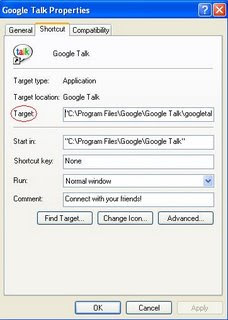
၄။ ထို႔ေနာက္ Target Address ၏ေနာက္ဆံုးတြင္ space ျခားၿပီး /nomutex ဆိုေသာ စာသားေလးကို ရိုက္ထည့္ေပးလိုက္ပါ။
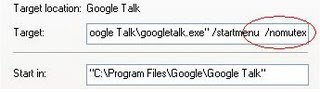 ၅။ ထို႔ေနာက္ Apply ကို Click လုပ္ပါ။ ၿပီးလွ်င္ သင္၏ primary gamil address ႏွင့္ GTalk သို႔ Login လုပ္ပါ။ဒုတိယအႀကိမ္၀င္ရန္အတြက္ Desktop ေပၚတြင္ရွိေသာ GTalk icon ကို Click ႏွိပ္ၿပီး secondary gmai address ႏွင့္ username ကိုထည့္ပါ။ ဒါဆုိ သင့္တြင္ GTalk window ႏွစ္ခု ေပၚလာၿပီး လက္မေညာင္းမခ်င္း ခ်က္ႏုိင္ပါၿပီ
Post From notes4pc.blogspot.com
June 6, 2007
အဘြား
ေလာကမွာလူဘယ္ႏွစ္ေယာက္ေလာက္
အဘြားအိုျဖစ္ခြင့္ရိွပါသလဲ
ေမြးခါစကေန အဘြားအိုဘ၀ထိေရာက္ေအာက္ အရာရာကို
သူျဖတ္သန္းခဲ့တယ္
တြန္႔တြေနတဲ့ ပါးေရနားေရေတြဟာ ေဖ်ာ့ေတာ့ေအးျမတဲ့
မ်က္လံုးေတြကို ေကြ႔၀ိုက္ထားပံု
ခ်ိဳင့္ေနတဲ့ပါး၊ က်ိဳးေနတဲ့သြား၊ ကိုင္းေနတဲ့ခါး၊ ထိုင္းေနတဲ့နား၊
၀ါးေနတဲ့မ်က္စိနဲ႔ သား၊ေျမး၊ျမစ္ ဘုစုခရုေတြကို ဆံပင္ျဖဴ
ႏုတ္ခိုင္းေနတဲ့အဘြား
ကၽြန္ေတာ္ကိုယ့္အဘြားကိုၾကည့္ၿပီး ရယ္ခ်င္တယ္
သူ႕အနားေဗ်ာက္ေဖာက္ရင္ `ဘုရားႀကီးငုတ္တုတ္´ လို႕
ေယာက္တတ္တဲ့အဘြား
ထန္းလ်က္နဲ႔လက္ဖက္ကို ေက်ာသားရင္သားမခဲြျခား
မီွ၀ဲတဲ့အဘြား
တုတ္ေကာက္နဲ႔ကုန္းကြကြ လမ္းေလွ်ာက္တဲ့အဘြား
အိမ္ေရွ႕ကြပ္ပ်စ္ေပၚကေန၀င္ရီမွာ ေျပာင္းဖူးဖက္ေဆးလိပ္
တဖြားဖြား ဖြာေနျပန္တဲ့အဘြား
အဘြားဟာ ကၽြန္ေတာ္တို႕အမ်ိဳးရဲ႕ သမိုင္းစာအုပ္
အဘြားဟာ ကၽြန္ေတာ္တို႔ရဲ႕ ပံုျပင္စာအုပ္၊
ဘုရားရိွခိုးအမ်ိဳးမ်ိဳးစာအုပ္
အဘြားဟာ ငါးရာ့ငါးဆယ္နိပါတ္ေတာ္စာအုပ္ေပါ့
အဘြားဟာ အင္တာနက္မဖတ္တတ္ေပမဲ့ ပရိတ္ႀကီး (၁၁) သုတ္
အလြတ္ရတယ္
အဘြားဟာ ကုလားကားမၾကည့္ရေပမဲ့ ကုလားမုန္႕ေလးေတြ
ေကၽြးတတ္တယ္
အိမ္တစ္အိမ္မွာ ကေလးတစ္ေယာက္ရိွေနတာဟာ သာယာသလို
အိမ္တစ္အိမ္မွာ အဘြားအိုတစ္ေယာက္ရိွေနတာလည္း ေပ်ာ္စရာပါ
ေၾကာင္အိုေတာ့ ၾကြက္မေလးဆိုသလို
အဘြား႐ိုက္ရင္ မနာဘူး
အဘြားဘာစားစား မကုန္ဘူး
အဘြားဟာ ဆန္မကုန္ေျမမေလး သက္ရိွ႐ုပ္ၾကြင္းလား
မယားဆိုပ်ိဳမွ
အဘြားဆိုအိုမွ
အိုတာကိုက လွတာပါပဲ
ဒီအဘြားဟာ
ေနာက္ထပ္အဘြားေတြဘယ္ေလာက္မ်ားမ်ားေမြးထုတ္ေပးမလဲ
ဆိုတာေတာ့
အဘြားေရာ အဘြားျဖစ္လာမယ့္သူေတြေရာ ဘယ္သူမွ ဖြင့္
ၾကည့္ခြင့္မရခဲ့ဘူး။
၀ိုင္ခ်ိဳ
အဘြားအိုျဖစ္ခြင့္ရိွပါသလဲ
ေမြးခါစကေန အဘြားအိုဘ၀ထိေရာက္ေအာက္ အရာရာကို
သူျဖတ္သန္းခဲ့တယ္
တြန္႔တြေနတဲ့ ပါးေရနားေရေတြဟာ ေဖ်ာ့ေတာ့ေအးျမတဲ့
မ်က္လံုးေတြကို ေကြ႔၀ိုက္ထားပံု
ခ်ိဳင့္ေနတဲ့ပါး၊ က်ိဳးေနတဲ့သြား၊ ကိုင္းေနတဲ့ခါး၊ ထိုင္းေနတဲ့နား၊
၀ါးေနတဲ့မ်က္စိနဲ႔ သား၊ေျမး၊ျမစ္ ဘုစုခရုေတြကို ဆံပင္ျဖဴ
ႏုတ္ခိုင္းေနတဲ့အဘြား
ကၽြန္ေတာ္ကိုယ့္အဘြားကိုၾကည့္ၿပီး ရယ္ခ်င္တယ္
သူ႕အနားေဗ်ာက္ေဖာက္ရင္ `ဘုရားႀကီးငုတ္တုတ္´ လို႕
ေယာက္တတ္တဲ့အဘြား
ထန္းလ်က္နဲ႔လက္ဖက္ကို ေက်ာသားရင္သားမခဲြျခား
မီွ၀ဲတဲ့အဘြား
တုတ္ေကာက္နဲ႔ကုန္းကြကြ လမ္းေလွ်ာက္တဲ့အဘြား
အိမ္ေရွ႕ကြပ္ပ်စ္ေပၚကေန၀င္ရီမွာ ေျပာင္းဖူးဖက္ေဆးလိပ္
တဖြားဖြား ဖြာေနျပန္တဲ့အဘြား
အဘြားဟာ ကၽြန္ေတာ္တို႕အမ်ိဳးရဲ႕ သမိုင္းစာအုပ္
အဘြားဟာ ကၽြန္ေတာ္တို႔ရဲ႕ ပံုျပင္စာအုပ္၊
ဘုရားရိွခိုးအမ်ိဳးမ်ိဳးစာအုပ္
အဘြားဟာ ငါးရာ့ငါးဆယ္နိပါတ္ေတာ္စာအုပ္ေပါ့
အဘြားဟာ အင္တာနက္မဖတ္တတ္ေပမဲ့ ပရိတ္ႀကီး (၁၁) သုတ္
အလြတ္ရတယ္
အဘြားဟာ ကုလားကားမၾကည့္ရေပမဲ့ ကုလားမုန္႕ေလးေတြ
ေကၽြးတတ္တယ္
အိမ္တစ္အိမ္မွာ ကေလးတစ္ေယာက္ရိွေနတာဟာ သာယာသလို
အိမ္တစ္အိမ္မွာ အဘြားအိုတစ္ေယာက္ရိွေနတာလည္း ေပ်ာ္စရာပါ
ေၾကာင္အိုေတာ့ ၾကြက္မေလးဆိုသလို
အဘြား႐ိုက္ရင္ မနာဘူး
အဘြားဘာစားစား မကုန္ဘူး
အဘြားဟာ ဆန္မကုန္ေျမမေလး သက္ရိွ႐ုပ္ၾကြင္းလား
မယားဆိုပ်ိဳမွ
အဘြားဆိုအိုမွ
အိုတာကိုက လွတာပါပဲ
ဒီအဘြားဟာ
ေနာက္ထပ္အဘြားေတြဘယ္ေလာက္မ်ားမ်ားေမြးထုတ္ေပးမလဲ
ဆိုတာေတာ့
အဘြားေရာ အဘြားျဖစ္လာမယ့္သူေတြေရာ ဘယ္သူမွ ဖြင့္
ၾကည့္ခြင့္မရခဲ့ဘူး။
၀ိုင္ခ်ိဳ
June 2, 2007
အေဖ့ကိုနားလည္စာနာပါ
အေဖခ်စ္တဲ့သား.... သားအျမင္မွာ အေဖအိုလာၿပီလို႕ ထင္ေနမလားပဲ။ အေဖမအိုေသးပါဘူး။ အေဖ့ကိုသည္းခံနားလည္ေပးပါ။ အေဖစားေသာက္တဲ့အခါ အေဖ့အ၀တ္အစားေတြ ညစ္ပတ္ေပေရတဲ့အခါက်ရင္သားငယ္ငယ္က ညစ္ပတ္ေပေရလာတိုင္း အေဖကေရမိုးသန္႕စင္ေပးခဲ့တာေလးေတြ၊ ေျခသည္း၊လက္သည္းညႇပ္ေပးခဲ့တာေလးေတြ ျပန္သတိရလိုက္စမ္းပါ။ အေဖက အေၾကာင္းအရာတစ္ခုကို ထပ္တလဲလဲေျပာမိခဲ့ရင္လည္း နားမၿငီးပါနဲ႕။သားစိတ္မွာအေႏွာင့္အယွက္မျဖစ္ပါနဲ႕။ သည္းခံနားေထာင္ေပးပါ။ သားငယ္ငယ္တုန္းက သားအိပ္မေပ်ာ္မခ်င္း ပံုျပင္တစ္ပုဒ္ကို ထပ္တလဲလဲအေဖေျပာျပခဲ့တယ္ေလ။ အေဖ ေရမခ်ိဳးခ်င္လို႕ ျငင္းခဲ့ရင္လည္း စိတ္မဆိုးနဲ႔ေနာ္။ သားငယ္ငယ္တုန္းကေရခ်ိဳးရမွာေၾကာက္လို႕ ဆင္ေျခအမ်ိဳးမ်ိဳးေပးၿပီး ထြက္ေျပးတိုင္း သားေနာက္ကို အေဖလိုက္လိုက္ဖမ္းခဲ့ရတာ မွတ္မိမွာပါ။ သားရဲ႕ေခတ္မီပစၥည္းကိရိယာေတြကို အေဖအသံုးမွားခဲ့ရင္ `ညံ့လွခ်ည္လားဆိုတဲ့အၾကည့္မ်ိဳးနဲ႕သေရာ္ၿပံဳး မၿပံဳးပါနဲ႕သားရယ္။ သားတို႕ကို ၀တ္တတ္၊စားတတ္၊ ေျပာတတ္၊ဆိုတတ္ေအာင္ အေဖက အမ်ိဳးစံုသင္ျပေပးခဲ့တာ ျပန္သတိရလိုက္စမ္းပါ။ သားနဲ႔အေဖစကားေျပာရင္းက ေျပာလက္စအေၾကာင္းအရာေလးေမ့သြားရင္လည္းျပန္စဥ္းစားဖို႕အခ်ိန္ေပးပါ။ ျပန္သတိမရခဲ့ရင္လည္း သားစိတ္မွာ အေႏွာင့္အယွက္မျဖစ္ပါနဲ႕။တကယ္ေတာ့ အေဖေျပာတဲ့စကားကအေရးမႀကီးပါဘူး။ အေရးႀကီးတာက အေဖ့အနားမွာသားရိွေနၿပီး အေဖေျပာျပေနတာကို သားနားေထာင္ေနဖို႕ပါ။ အေဖစားခ်င္စိတ္မရိွလို႕ မစားရင္လည္းဇြတ္မေကၽြးပါနဲ႔။ ဘယ္အခ်ိန္မွာ စားဖို႕လိုတယ္ဘယ္အခ်ိန္မွာမစားရဘူးဆိုတာ အေဖေကာင္းေကာင္းသိပါတယ္။ ပင္ပန္းႏြမ္းနယ္ေနတဲ့ အေဖ့ေျခေထာက္ေတြမေလွ်ာက္ႏိုင္တဲ့အခါ သားငယ္ငယ္က အေဖ့လက္ေတြနဲ႕ ေဖးမၿပီး လမ္းေလွ်ာက္သင္ေပးခဲ့သလို သားလက္ေတြနဲ႔ အေဖ့ကိုကူေပးပါလား။ တစ္ေန႔ေန႔မွာ ဒီလူ႔ဘ၀ႀကီးကို အေဖၿငီးေငြ႕ၿပီလို႕ေျပာခဲ့ရင္ စိတ္မေကာင္းမျဖစ္ပါနဲ႕။တစ္ေန႔က်ရင္ သားနားလည္လာပါလိမ့္မယ္။ အသက္ရွည္ေပမဲ့ ေနဖို႔မေကာင္းေတာ့တဲ့အသက္အရြယ္ပါလားလို႕ နားလည္ေပးပါ။ အေဖ့အမွားေတြ၊ ပ်က္ကြက္မႈေတြ ရိွေကာင္းရိွခဲ့ေပမဲ့ အေဖဟာသားကို အေကာင္းဆံုးအၿမဲပဲျဖစ္ေစခ်င္တယ္။ အေကာင္းဆံုးျဖစ္ေအာင္လည္း အေဖႀကိဳးစားပံ့ပိုးေပးခဲ့တယ္ဆိုတာသားတစ္ေန႔သိလာပါလိမ့္မယ္။ သားအနားမွာ အေဖရိွေနလို႕ သားစိတ္အေႏွာင့္အယွက္မျဖစ္ပါနဲ႔။ သားငယ္စဥ္တုန္းကသားဘ၀အစမွာ သားကိုအေဖျပဳစုခဲ့သလို အေဖ့အနားမွာ သားေနရမယ္။ အေဖ့ကိုနားလည္ေအာင္ႀကိဳးစားရမယ္။ အေဖ့ကို ကူေပးရမယ္။ အေဖလမ္းေလွ်ာက္တဲ့အခါ ကူေပးပါ။ အေဖ့ဘ၀ေန၀င္ခ်ိန္မွာ သားရဲ႕ေမတၱာနဲ႔သည္းခံေပးပါ။ အေဖကေတာ့ သားအေပၚမွာ အစဥ္အၿမဲရိွေနတဲ့ေမတၱာအျပည့္ကို ေဖာ္ျပတဲ့အၿပံဳးေလးနဲ႔တံု႔ျပန္ေပးေနမွာပါ။ သားကို အေဖခ်စ္တယ္။ သားရဲ႕အေဖ
အာဏာရွင္ဆိုသည္မွာ
အာဏာရွင္အစိုးရတို႕သည္ တိုင္းျပည္လူထု၏အက်ိဳးကိုေရွး႐ႈ၍ အာဏာရွင္စနစ္ကို က်င့္သံုးရျခင္းျဖစ္သည္ဟုယံုၾကည္ၾက၏။ အာဏာရွင္မိဘတို႕သည္ သားသမီးမ်ားကို ခ်စ္ေသာေၾကာင့္ဖိႏိွပ္ခ်ဳပ္ခ်ယ္ထားျခင္းျဖစ္သည္ဟု ဆိုၾက၏။ အာဏာရွင္တို႕သည္ မိမိတို႕၏အတၱမာနအားႀကီးမႈကို ၀န္ခံၾကမည္မဟုတ္ေခ်။ သူတို႕၏လက္ေအာက္ခံလူမ်ားကလည္း မိမိတို႕၏မိဘ၊ သို႕မဟုတ္ ေခါင္းေဆာင္မ်ားကို ၾကည္ညိဳေလးစားေသာေၾကာင့္ အမိန္႕နာခံျခင္းျဖစ္သည္ဟုယံုၾကည္ၾက၏။ စင္စစ္ မိမိတို႕၏အစြမ္းသတၱိညံ့ဖ်င္းမႈ၊ လြတ္လပ္ေရးကိုတန္ဖိုးမထားမႈ၊ မိမိကုိယ္ကိုအားမကိုးဘဲ သူတစ္ပါးကိုမီွခိုလိုမႈ စေသာအားနည္းခ်က္မ်ားေၾကာင့္ က်ိဳးႏံြျခင္းျဖစ္ေၾကာင္း မသိျမင္ၾကေခ်။
ဦးေအးေမာင္ (`ဗုဒၶႏွင့္ဗုဒၶ၀ါဒ´မွ ေကာက္ႏႈတ္ေဖာ္ျပသည္)
ဦးေအးေမာင္ (`ဗုဒၶႏွင့္ဗုဒၶ၀ါဒ´မွ ေကာက္ႏႈတ္ေဖာ္ျပသည္)
May 29, 2007
အေခါင္းအေရာင္းအ၀ယ္
တစ္ခါက အေခါင္းေရာင္းသူတစ္ေယာက္ထံ လူတစ္ေယာက္က အေခါင္းလာ၀ယ္ေလသည္။`အေခါင္းတစ္လံုးေလာက္လိုခ်င္လို႔ဗ်ာ..တစ္လံုးဘယ္ေလာက္လဲ´ ဟုေမးရာအေခါင္းေရာင္းသူက `တစ္လံုးတစ္ေသာင္းခဲြပါ´ ဟုျပန္ေျပာေလသည္။အေခါင္း၀ယ္သူက `မမ်ားလြန္းဘူးလားဗ်ာ..ေလ်ာ့ပါဦး´ဟုဆိုေလသည္။အေခါင္းေရာင္းသူက `ေစ်းေတာ့မဆစ္ပါနဲ႕ေနာင္ႀကီးရယ္..လိုခ်င္ရင္ အေခါင္းေသးတစ္လံုးအပိုေပးပါ့မယ္´
သုသာန္ေျမေနရာျဖစ္သည္
တစ္ခါက ဆိုင္းဘုတ္ပန္းခ်ီဆရာတစ္ေယာက္ဟာ
မျဖစ္ပါဘူးဗ်ာ..ဒီဆိုင္းဘုတ္ကို က်ဳပ္ကိုယ္တိုင္ သြားပို႔မွျဖစ္မယ္ လို႔ညည္းတြားလိုက္သတဲ့
အဲဒီမွာ သူ႔အသိတစ္ေယာက္က
ဟာ..ခင္ဗ်ားလို ပညာရွင္က ပညာရွင္လိုေနစမ္းပါဗ်ာ၊ သူ႔ဘာသာသူ လာယူလိမ့္မေပါ့
ဘာသြားေပးစရာလိုတုန္း
ခင္ဗ်ားက ေျပာေရာ့မယ္..ဆိုင္းဘုတ္ကိုလည္းဖတ္ၾကည့္လိုက္အုန္း
ထိုသို႔ေျပာ၍ဆိုင္းဘုတ္ကိုလွမ္းၾကည့္လိုက္ေသာအခါ
ဆိုင္းဘုတ္တြင္ ေရးထားသည္မွာကား
ဤေနရာသည္ သုသာန္ေျမေနရာျဖစ္သည္...တဲ့.
မျဖစ္ပါဘူးဗ်ာ..ဒီဆိုင္းဘုတ္ကို က်ဳပ္ကိုယ္တိုင္ သြားပို႔မွျဖစ္မယ္ လို႔ညည္းတြားလိုက္သတဲ့
အဲဒီမွာ သူ႔အသိတစ္ေယာက္က
ဟာ..ခင္ဗ်ားလို ပညာရွင္က ပညာရွင္လိုေနစမ္းပါဗ်ာ၊ သူ႔ဘာသာသူ လာယူလိမ့္မေပါ့
ဘာသြားေပးစရာလိုတုန္း
ခင္ဗ်ားက ေျပာေရာ့မယ္..ဆိုင္းဘုတ္ကိုလည္းဖတ္ၾကည့္လိုက္အုန္း
ထိုသို႔ေျပာ၍ဆိုင္းဘုတ္ကိုလွမ္းၾကည့္လိုက္ေသာအခါ
ဆိုင္းဘုတ္တြင္ ေရးထားသည္မွာကား
ဤေနရာသည္ သုသာန္ေျမေနရာျဖစ္သည္...တဲ့.
May 24, 2007
Feeds ေတြသံုးသင့္ၿပီဗ်ိဳ႕
Feed ဆိုတာက Website ေတြရဲ႕ Update ျဖစ္ေနတဲ့အေၾကာင္းအရာေတြကို အႏွစ္ခ်ဳပ္ဒါမွမဟုတ္ အျပည့္အစံုေဖာ္ျပေပးတဲ့ XML File တစ္ခုပါ။Feed ေတြကို အသံုးျပဳျခင္းအားျဖင့္ ကိုယ္အၿမဲတမ္းၾကည့္ေနတဲ့ Website ေတြရဲ႕ Update Content ေတြကိ တစ္ခါတည္းနဲ႕ သိရိွႏိုင္မွာ ျဖစ္ပါတယ္။ Website ေတြအမ်ားႀကီးဖြင့္ၿပီး ၾကည့္ရတဲ့အခ်ိန္ေတြ သက္သာသြားမွာျဖစ္ပါတယ္။Feed Format ႏွစ္မ်ိဳးရိွပါတယ္။ RSS & Atom ပါ။ ကိုယ္အဆင္ေျပတဲ့ဟာ သံုးလို႕ရပါတယ္။လိုအပ္တာကေတာ့ Feed Reader ပါ။ Feed Reader ထဲမွာ ကိုယ္မွန္မွန္ၾကည့္ေနတဲ့Website ေတြရဲ႕ Feed patch ကိုထည့္ေပးရမွာပါ။ကၽြန္ေတာ္အႀကိဳက္ဆံုး Online Feed Reader ကေတာ့ http://reader.google.com/ ပါ။Google Account မရိွသူေတြအတြက္ http://www.bloglines.com/ ကိုလည္းသံုးႏိုင္ပါတယ္။ကဲ..ဒါျဖင့္ ဘယ္လိုစသံုးမလဲ။ဥပမာအေနနဲ႕ http://news.google.com/ ကို၀င္ၾကည့္ပါ။ပံုမွာျပထားတဲ့ RSS ဆိုတဲ့ link ကိုႏိွပ္ပါ။ ထြက္လာတဲ့ Page ရဲ႕ Link ကို Copy လုပ္ပါ။

reader.google.com ကိုသြားပါ။ Login လုပ္ပါ။Google reader ပြင့္လာရင္ Add Subscription ဆိုတဲ့ Link ကိုႏိွပ္ပါ။Text Box ထဲမွာ Paste လုပ္၊ Add ကိုႏိွပ္လိုက္ရင္ Google News Feed ေတြကိုဖတ္လို႔ရပါၿပီ။ ဒီနည္းနဲ႕ တျခား Website ေတြရဲ႕ Feed ေတြကိုလိုက္ထည့္ပါ။ ဒါဆိုရင္ အခ်ိန္ကုန္သက္သာၿပီး Website အမ်ားႀကီးရဲ႕ Update အေၾကာင္းအရာေတြကို reader.google.comကေန သိရွိႏိုင္ပါၿပီ။

reader.google.com ကိုသြားပါ။ Login လုပ္ပါ။Google reader ပြင့္လာရင္ Add Subscription ဆိုတဲ့ Link ကိုႏိွပ္ပါ။Text Box ထဲမွာ Paste လုပ္၊ Add ကိုႏိွပ္လိုက္ရင္ Google News Feed ေတြကိုဖတ္လို႔ရပါၿပီ။ ဒီနည္းနဲ႕ တျခား Website ေတြရဲ႕ Feed ေတြကိုလိုက္ထည့္ပါ။ ဒါဆိုရင္ အခ်ိန္ကုန္သက္သာၿပီး Website အမ်ားႀကီးရဲ႕ Update အေၾကာင္းအရာေတြကို reader.google.comကေန သိရွိႏိုင္ပါၿပီ။
သစ္ခုတ္သမားနဲ႕ ပုဆိန္
တစ္ခါက သစ္ခုတ္သမားတစ္ေယာက္ဟာ ပုဆိန္တစ္လက္နဲ႕ သစ္ခုတ္တယ္တဲံ။စခုတ္စခါက တစ္ေန႕ကိုအပင္ႏွစ္ဆယ္ေလာက္ ခုတ္ႏိုင္တယ္။ ဒါနဲ႕ပဲ အခ်ိန္ပိုယူဇဲြမေလ်ာ့ပဲ ဆတ္ခုတ္ေပမဲ့ တျဖည္းျဖည္းနဲ႕ ခုတ္ႏိုင္တဲ့အပင္အေရအတြက္ဟာ နည္းနည္းလာတာကို သတိျပဳမိေပမဲ့ ဘာေၾကာင့္မွန္း သူစဥ္းစားလို႕မရဘူးျဖစ္ေနသတဲ့။အဲဒီမွာ လမ္းေဘးခရီးသြားတစ္ေယာက္က ခင္ဗွ်ားပုဆိန္ကို မေသြးေသးဘူးလား လို႕ေမးတယ္အဲဒီမွာ သစ္ခုတ္သမားက ကၽြန္ေတာ့္မွာ ခုတ္စရာအပင္ေတြအမ်ားႀကီးက်န္ေသးလို႕မေသြးႏိုင္ေသးပါဘူးဗ်ာ လို႕ ျပန္ေျပာသတဲ့။
May 23, 2007
Comparing IE And Firefox


MP3 Playerမွာသီခ်င္းစာသားေပၚေအာင္လုပ္နည္း
အခုေနာက္ေပၚတဲ့ MP3 Player ေတြမွာ သီခ်င္းနားေထာင္ေနရင္း သီခ်င္းစာသားေပၚေအာင္လုပ္လို႔ရေနပါၿပီ။ နည္းကလြယ္လြယ္ေလးပါ။ ပထမဆံုး သီခ်င္းဖိုင္ကို MP3 ထဲထည့္ပါ။ ဥပမာ- M2M-Pretty Boy ဆိုပါေတာ့။သီခ်င္းစာသားဖိုင္ကို http://www.lrcdb.org/ ကေန ရယူပါ။ ၿပီးေတာ့ MP3 ထဲထည့္ပါ။သတိထားရမွာက စာသားဖိုင္နဲ႕ အသံဖိုင္နဲ႕ ဖိုင္အမည္ျခင္း တူရပါ့မယ္။ဒါဆိုရင္ စနားေထာင္လို႕ ရပါၿပီ။MP3 ကိုဖြင့္၊ နားက်ပ္ကိုတပ္၊ သီခ်င္းဖြင့္၊ သီခ်င္းလာၿပီဆိုတာနဲ႕ MP3က Mode ခလုတ္ကိုသံုးစကၠန္႕ေလာက္ႏိွပ္လိုက္ရင္သီခ်င္းစာသားေလးေတြ ေပၚလာပါလိမ့္မယ္
Subscribe to:
Comments (Atom)